
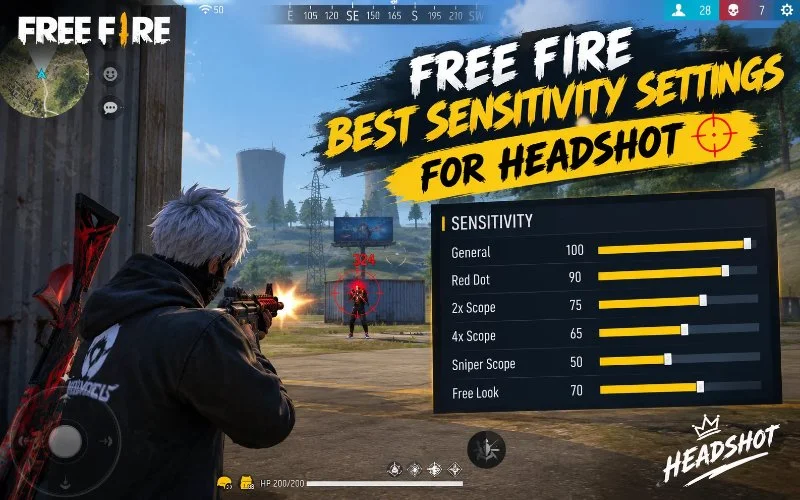
The Free Fire Best Sensitivity Settings For Headshot start high for General and Red Dot (about 90 to 100), come down for the scopes, drop a lot for the sniper scope, and then you fine-tune by 3 to 5 points in Training Ground until your crosshair lands on the head.
It is the last circle. Your squad is gone, one enemy is peeking from behind a wall, and your thumb does what it always does: it swipes a little too low. Chest shot. Enemy survives. You stare at the screen like it personally insulted you.
We have all been there. The good news is that your aim is often not the problem. Your sliders might be. In this article, you will get simple starting numbers, easy fixes, and a short test plan, so you can find the Free Fire Best Sensitivity Settings For Headshot that suit your phone and your thumb. No jargon. No magic. Just clear steps and a few jokes to keep you awake.
Free Fire at a Glance (Stats Table)
| Detail | What We Found |
|---|---|
| Game | Free Fire (and the Free Fire MAX version) |
| Publisher | Garena |
| First launched | 2017 (Source: publisher announcements; verify exact date) |
| Platforms | Android and iPhone |
| Sensitivity sliders | 6: General, Red Dot, 2x Scope, 4x Scope, AWM Scope, Free Look |
| Classic slider range | 0 to 100 |
| 2026 note | Some 2026 websites mention a 0 to 200 slider after the OB54 update. |
| Best place to test | Training Ground |
| Official sensitivity generator | None found by us (verify with the publisher) |
| Article last updated | October 16, 2026 |
What Is Sensitivity, and Why Does It Decide Your Headshots?
Think of sensitivity as the speed of your crosshair. When you slide your thumb one inch, a high setting moves the crosshair far. A low setting moves it a little.
Why does that matter for headshots? The head is a tiny target. If your crosshair moves too slowly, you cannot reach the head in time. If it moves too fast, you fly past it. A good setting sits in the middle, where a small thumb move puts the dot right on the head.
Here is the part most people miss. There is no single perfect number for everybody. Your phone, screen size, thumb size and play style all change what feels right. That is why we call the numbers in this article a starting point, not a promise.
Where to Find Your Sensitivity Settings
Finding the sliders takes less than a minute:
- Open Free Fire and tap the Settings icon (the gear).
- Open the Sensitivity tab.
- You will see sliders for General, Red Dot, 2x Scope, 4x Scope, AWM Scope and Free Look.
- Move a slider, then test it in Training Ground.
Free Fire Best Sensitivity Settings For Headshot: Starting Numbers
Here is the starting table. We built it by comparing public 2026 settings lists and choosing the middle ground where most of them agree. Treat it as your first draft, not your final answer.
| Slider | Starting Number (0 to 100 scale) | Plain-Words Meaning |
|---|---|---|
| General | 95 | Moves your view when you are not using a scope |
| Red Dot | 92 | Moves your view with the red dot sight |
| 2x Scope | 85 | Small zoom, medium speed |
| 4x Scope | 75 | Bigger zoom, slower speed |
| AWM Scope | 40 | Sniper scope, slowest speed for steady aim |
| Free Look | 80 | Looking around without turning your body (does not change your shots) |
Why the Numbers Go Down as Zoom Goes Up
Zoom makes everything look bigger. A tiny thumb move looks like a huge move through a 4x scope. So you lower the number as you zoom in. That keeps your aim calm and steady when it matters most.
Why General and Red Dot Stay High
Most fights in Free Fire happen close up. You need to turn fast, find the head quickly and tap. High numbers on the first two sliders help you do that.
Scope-by-Scope Settings Explained
Each slider has a job. Here is a quick table to keep them straight.
| Slider | Best Used For | If It Feels Off |
|---|---|---|
| General | Running, turning and close fights | Lower by 3 to 5 if you overshoot the head |
| Red Dot | Short and medium fights | Raise by 3 to 5 if you cannot reach the head in time |
| 2x Scope | Medium range | Lower slightly if your aim shakes |
| 4x Scope | Long range | Lower by 5 if you keep missing over the head |
| AWM Scope | Sniping | Keep low and steady |
| Free Look | Checking around corners | Set to what feels comfy |
The 0 to 200 Slider Question
Some 2026 websites say Free Fire now shows a 0 to 200 slider after a mid-year update. We could not confirm this from an official source, so we are treating it as unverified.
Here is what to do if your game shows a 0 to 200 slider:
- Do not simply double the old numbers. One public source warns that doubling can feel off, because the feel of each step changes.
- Start by doubling, then lower the scope numbers by 5 to 15 if your aim feels shaky.
- Test in Training Ground and adjust in small steps.
If your slider stops at 100, you can use the table above as it is.
Free Fire Best Sensitivity Settings Mobile: Low-End, Mid-Range and High-End Phones
Not every phone moves the same. Older phones with small memory often feel slower, so many players push the numbers higher. Newer phones feel smoother, so slightly lower numbers can work better.
| Phone Type | General | Red Dot | 2x | 4x | AWM | Free Look |
|---|---|---|---|---|---|---|
| Low-end (about 2GB memory) | 98 | 96 | 90 | 78 | 42 | 88 |
| Mid-range (about 4GB memory) | 96 | 94 | 88 | 78 | 45 | 85 |
| High-end (6GB or more) | 92 | 90 | 84 | 74 | 44 | 80 |
The Free Fire Best Sensitivity Settings Mobile players use also depend on screen smoothness. Phones that refresh the screen faster (shown as 90Hz or 120Hz) feel quicker under your thumb, so many players lower their numbers a little. For example, one public source suggests starting about 5 to 8 points lower on a 90Hz phone and a bit lower again on a 120Hz phone.
A Simple Rule for Phones
If your crosshair feels slow, raise the numbers by 3 to 5. If it feels jumpy, lower them by 3 to 5. Change one slider at a time. Otherwise, you will not know what helped.
Free Fire Best Sensitivity Settings iPhone: What Is Different?
iPhones have a reputation for smooth touch. Many newer models also have a very smooth screen. That means your thumb can feel faster than it would on an older Android phone.
| iPhone Situation | Where to Start | Why |
|---|---|---|
| Newer iPhone with a smooth screen | Use the high-end row above | Smooth screens feel fast |
| Older iPhone | Use the mid-range row above | Slightly slower feel |
| iPad or large iPhone | Lower the scope numbers by 3 to 5 | Bigger screens give your thumb more travel |
Free Fire Best Sensitivity Settings Screen: Size, Thumbs and Buttons
Your screen shapes your settings as much as your phone does. The Free Fire Best Sensitivity Settings Screen conversation is really about three things: size, cleanliness and your fire button.
Screen Size
- Small screens: Your thumb covers a lot of the screen. You may need a higher number to reach the head with a short swipe.
- Big screens and tablets: Your thumb has more room, so you can go slightly lower for steadier aim.
A Clean, Dry Screen
Sweaty fingers stick. A greasy screen makes your swipes jerky. Wipe your screen and your thumb before a ranked match. It costs nothing and helps more than you think.
Fire Button Size and Placement
Many public lists suggest a fire button size of about 42 to 50 percent for headshot-focused players. A bigger button is easier to press, but it can block your view. A smaller button keeps the screen clear, but it is harder to tap. Find the size where you can tap and drag without your thumb sliding off.
Screen Protectors
A thick or scratched protector can make your swipe feel sticky. If your drag feels rough, try cleaning or replacing it.
Free Fire Best Sensitivity Generator: Helpful or Hype?
You will see many websites with a Free Fire Best Sensitivity Generator. You choose your phone, click a button and get numbers. Sounds great. Does it work?
Here is our honest view. A Free Fire Best Sensitivity Generator can give you a decent first draft, like a recipe that says “add salt to taste.” It cannot feel your thumb. We found no official generator from the publisher, so every tool you see is made by someone else.
How to Use a Generator Safely
- Use it only for a starting point.
- Never enter your Free Fire login, password or account details. A real generator does not need them.
- Do not download strange apps that promise “auto headshot” or “aim boost.” These can steal your account or break the game’s rules.
- Test the numbers in Training Ground and adjust.
Quick Comparison
| Option | Good Side | Weak Side |
|---|---|---|
| Free Fire Best Sensitivity Generator | Fast first draft | Cannot match your thumb or screen |
| Copying a pro player | Proven for them | Their phone and hands differ from yours |
| Testing by hand | Fits you best | Takes a little time |
Free Fire Best Sensitivity Settings 2026: What Changed This Year?
Free Fire gets new updates through the year, and some 2026 sources report changes to sensitivity menus and to the slider range. The 2026 story is simple: do not trust old numbers blindly.
The Free Fire Best Sensitivity Settings 2026 approach is:
- Check which slider range your game shows.
- Start from the table above.
- Re-test after every big update, because small menu changes can change how your aim feels.
For Free Fire Best Sensitivity 2026, the old advice still holds: high for close fights, lower for zoom, and one change at a time. What changes is how you check your numbers after each update.
Here is where the year stands:
| Topic | 2026 Status |
|---|---|
| Slider range | Classic 0 to 100; some sources mention 0 to 200 [verify] |
| Best approach | Start, test, tune |
| Generators | Third-party only; no official one found |
| Practice mode | Training Ground still the best place to test |
Conclusion
Here are the key points to take away:
- The Free Fire Best Sensitivity Settings For Headshot start high for General and Red Dot, lower for scopes and lowest for the sniper scope.
- Your phone, screen size and thumb shape what feels right, so treat every number as a starting point.
- Check whether your game shows a 0 to 100 or 0 to 200 slider before you copy any numbers.
- A Free Fire Best Sensitivity Generator is fine for a first draft but never share your login.
- Change one slider at a time, by 3 to 5 points, and test in Training Ground.
- Re-check your numbers after big updates.
Frequently Asked Questions
1. What is the best sensitivity for headshots in Free Fire?
There is no single best number. A good starting point is General 95, Red Dot 92, 2x 85, 4x 75 and AWM 40 on a 0 to 100 scale, then adjust by 3 to 5 points to fit your phone and thumb.
2. Does the best sensitivity change for iPhone and Android?
It can. Smooth, fast screens often feel quicker, so many players start a little lower on newer iPhones and high-end phones. Test on your own device, because there is no official iPhone-only list.
3. Is a Free Fire sensitivity generator safe?
The tools themselves are only number suggestions, but treat them with care. Never type your login or password, and avoid apps that promise auto-aim. We found no official generator from the publisher.
4. How often should I change my sensitivity?
Rarely. Test for a few days, settle on numbers, then only re-check after a big update or when you change your phone. Constant changes hurt your muscle memory.
5. Does Free Look change my headshot aim?
No. It only changes how you look around without turning your body. Set it to whatever feels comfortable.
Thanks for reading! Check out our previous blog:
- Ungraduate Gamer
- Decor Bhai Uid
- Skylord Uid
- Admino Gaming Bgmi ID
- Payal Gaming Bgmi ID
- Kaashvi Hiranandani Family
- Bixi Op Bgmi ID
- Jonathan Bgmi ID
- Jujutsu Zero Codes
- Fruit Battlegrounds Codes
- Sailor Piece Codes
- The Forge Roblox Codes
- Gyan Gaming Uid
- Lolzzz Gaming Bgmi ID
- Techno Gamerz Ujjwal
- Solo Leveling Arise Redeem Codes
- Arknights Endfield Redeem Codes
- Wuthering Waves Redeem Codes
- Free Fire Free Diamond Uid 99999
- Nitin Ff Uid
- Ankush Ff Uid
- White444 Uid
- M416 Glacier
- Call Of Duty Redeem Code
- Free Fire Colour Code
- Sudip Sarkar Uid
- Indian Bike Driving 3d cheat codes
- Total Gaming UID
- Untitled Boxing Game codes
- ×͜× Free Fire Name Alone Boy
- FC Mobile Codes
- Bgmi Game Name Style
- Top 10 Ff Name Style
- Raistar Ff Uid
